Can private budgeting also be convenient?
How Surebeans and Beanscrape solve the dilemma
 Doug · 2026-05-07
The problem: privacy is not convenient
If you're a privacy-conscious budgeter, you don't like it when someone other than you and your bank or credit card could see where you spend your money. There's always the possibility that your data is mined, sold, intercepted, or stolen, so you avoid connecting your budgeting app with aggregators like Plaid.
Following through on this conviction consigns you to a life of tedium. Each time you sit down to budget, you have two choices:
Tedious workflow 1
- Log in to your bank
- Navigate to the transactions table
- Look at each row.
- Decide which rows your budget app doesn't have yet
- Type each missing row, one by one, into your budget app
- Hope you didn't make any mistakes
Tedious workflow 2
- Log in to your bank
- Navigate to the file export
- Pick the right file format, e.g. CSV
- Download the file
- Go to your budget app
- Go to its import menu
- Find the file on your filesystem
- Map CSV columns to fields, e.g. Payee, Amount, Memo, Date.
- Clean up the data, like duplicates or
MYSTRY PMT#123
Repeat each month for each of your accounts. That's a lot of time and attention, the only resources more scarce than money. What a pain!
Privacy can be convenient
Imagine if you didn't have to choose between privacy and convenience.
What if there were a tool that imported transactions from any bank that happens to have a website? That's basically all banks.
What if it worked on your own computer, without any third party or cloud server?
What if syncing took under a minute, not thirty? Keeping up with your budget would be a breeze.
Hello, Beanscrape!
What I've just described is Beanscrape, a program that brings private and convenient transaction import to your budgeting workflow.
It's a command line program for Windows, macOS, and Linux. Prefer to use a GUI? No worries! You can use our friendly app called Surebeans which uses Beanscrape under the hood.
With Beanscrape, there's no third-party aggregator. It connects directly to your bank's website.
Beanscrape pulls in your transactions swiftly and easily. Instead of fiddling with CSV files, you can focus your time and attention on important things like your goals, priorities, and happiness.
How does it work?
Beanscrape automates a web browser to navigate to your bank website and download transactions. Since there are tens of thousands of banks in the world, there's no way Beanscrape could support all of them out of the box, so you first teach Beanscrape how to use your bank's website. This step can be a bit of work, but you only have to do it once per bank.
Once Beanscrape knows how to use your bank's website, it can fetch your transactions automatically.
Sounds great! How do I start?
You have a couple of options.
In Surebeans
The easy path is to install the Surebeans desktop version. (Beanscrape isn't supported in the browser version.)
Then in Settings, click the install button. 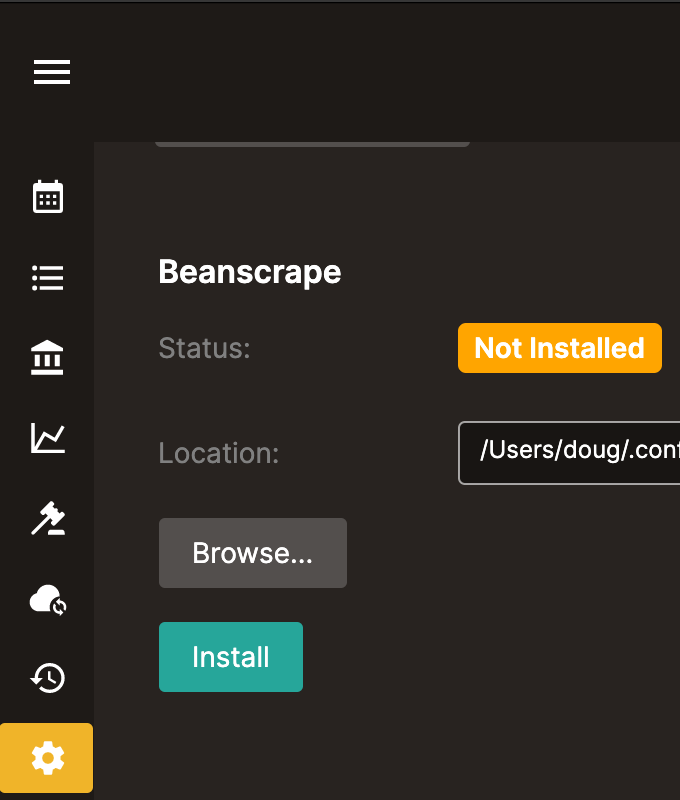
What you'll see after install: 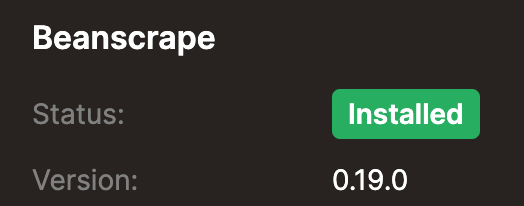
Now you can use Beanscrape in the Import menu. 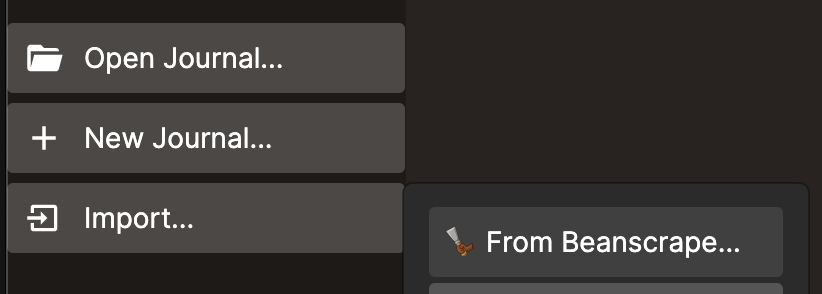
See the guide for the full step-by-step instructions.
On the command line
If you're comfortable with the command line, you can use Beanscrape directly. It's free and open-source. It outputs JSON or CSV, so you can use it with any budgeting app.
Summary
Beanscrape lets you fetch transactions from your bank website, saving you time compared to doing it manually and preserving your privacy compared to authorizing a third-party data aggregator like Plaid or YNAB.
Ready for convenient and private transaction import? Try Surebeans today!
To get help, send an email, or post on the forum. We're open to your feedback!